Your phone’s camera isn’t always the problem, it’s what happens after you take the shot. Maybe the lighting was off, colors fell flat, or everything looks slightly dull. That doesn’t mean the moment’s lost. Snapseed is the app that can pull those photos back from the edge.
It’s not a trendy filter app—it’s a real editing tool that fixes what went wrong and helps your photos look how they should have looked in the first place. Whether you’re dealing with shadows, bad contrast, or awkward angles, Snapseed gives you control without the clutter. It’s fast, free, and surprisingly capable.
What Sets Snapseed Apart?
Snapseed is made by Google, but it doesn’t scream for your attention like other photo apps packed with ads or forced subscriptions. It’s free and surprisingly deep. The app gives you real control over how your images look—without turning you into a full-time photo editor.
One of the best things about Snapseed is that it doesn't overwhelm you right away. It opens with a simple layout: just your photo and a small list of tools. But the moment you start tapping through the menus, you’ll realize how much is packed inside. There are pro-level features like “Curves” and “Selective” edits, but you can also just hit “Tune Image” and start adjusting the basics.
The app also gives you a lot of flexibility without requiring layers or complicated workflows. You can apply multiple edits in a row, stack them, go back, undo, or fine-tune anything without damaging the original photo. That’s a big deal—especially when you're editing on a small screen and want to try things without messing everything up.
Another reason Snapseed feels different is how tactile it is. Instead of dragging sliders, most edits are controlled by swiping up and down to choose what you want to adjust, then left and right to increase or decrease it. That method is quick, feels natural, and doesn't clutter your screen with menus.
Core Tools That Actually Fix Bad Photos
Snapseed isn’t about pretending your photo was perfect—it’s about actually fixing what’s wrong. Here are a few tools that make the biggest difference when your image needs serious help.
Tune Image
This is where most fixes start. You can adjust brightness, contrast, saturation, ambiance, highlights, shadows, and warmth. “Ambiance” alone can rescue flat or underexposed shots by boosting contrast and saturation in a balanced way.
Details
If your picture looks soft or slightly blurry, the “Structure” and “Sharpening” options here can help. Use them carefully, though—too much, and it’ll look fake fast.
White Balance
If your photo has weird color tones, this fixes it. Snapseed even lets you pick a neutral point manually, which gives you way more control than just guessing with sliders.
Selective Adjust
This is one of Snapseed’s strongest features. You can tap anywhere in your photo, then adjust brightness, contrast, or saturation just in that area. So if your subject is too dark but the background is fine, you can fix just the dark spot without ruining the rest.
Healing Tool
Got a tourist in the corner of your landscape photo? A random smudge on the table in your food shot? Tap the “Healing” tool, and you can brush over it. The app blends it out, and the spot disappears. It’s not perfect 100% of the time, but it often works shockingly well.
Perspective
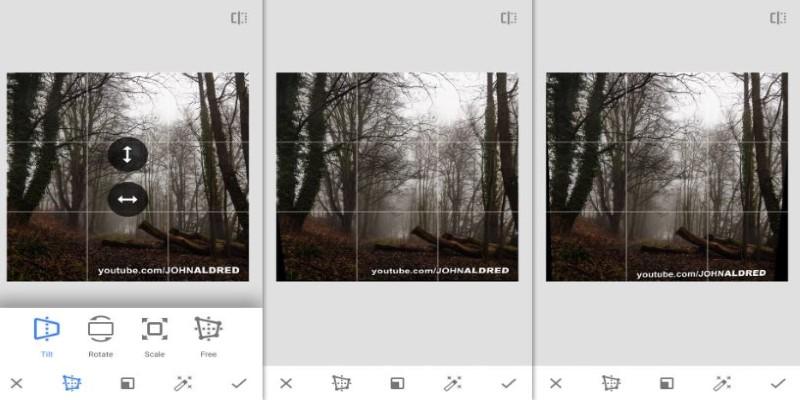
This lets you straighten tilted lines or fix skewed buildings. It even fills in missing edges intelligently. If you took a photo from a weird angle and the result looks distorted, this tool can make it feel more natural.
Curves and HDR Scape
For advanced edits, “Curves” offers full tonal control. And “HDR Scape” can rescue flat, cloudy photos by adding life and contrast—but it needs a light hand to avoid over-processing.
Easy to Use, Even Easier to Reuse
Snapseed isn’t just powerful, it’s smart about how it handles your edits. After you make changes, you can see a stack of all the edits you’ve applied. You can tap into any step to tweak it again or delete it. No need to start over from scratch if you change your mind halfway through.
Even better, Snapseed lets you create and save “Looks,” which are basically your own presets. If you edit a lot of photos in a similar way, maybe a consistent tone or brightness, you can save those settings and apply them with one tap on future edits.
And unlike other apps that require internet or backup accounts to keep your work safe, Snapseed does everything locally. It’s quick, even on older phones. That makes it a solid choice for anyone who just wants to fix their photos without having to sign up for anything or upload to a cloud.
It’s Not About Filters—It’s About Fixes
There are plenty of photo apps with endless filters trying to pass off mood as editing. But Snapseed’s approach is more honest. You’re not covering up bad photos with glitter and blur. You’re improving them. That’s what makes Snapseed different. It doesn’t need to fake anything.
Whether you’re working on a hazy landscape, a food pic that looks flat, or a portrait with weird lighting, Snapseed has the tools to fix it without making it look processed. You can go subtle or bold—but you’re in control either way.
And if you like your photos with a bit of character, Snapseed’s filters are still there. Tools like “Drama,” “Grainy Film,” or “Vintage” offer creative styles if you want them. But they’re not front and center, and they’re not forced on you.
Don’t Ditch the Photo—Fix It
Snapseed can’t transform a terrible photo into a masterpiece, but it can save a decent shot from being discarded. It puts real control in your hands over light, color, sharpness, and focus, without making editing complicated. As one of the most useful free apps, it’s quick, intuitive, and reliable. Whether you’re polishing everyday snapshots or aiming for more polished mobile photography, Snapseed delivers. Before deleting another “almost good” photo, give it a try—you may be surprised at the results.