Keeping up with the news can feel like trying to drink from a firehose. There's too much information, too many sources, and not enough time. That's why a good newsreader app can make such a difference. It brings your interests together in one space and filters out the noise. Whether you read the news daily or just check headlines when you have a moment, the right app can help you stay informed without feeling overwhelmed. Here's a look at some of the top apps available for iPhone users today.
Top iPhone News Reader Apps That Actually Make Reading Easier
Apple News
Apple News is the default choice for many iPhone users, and with good reason. It’s already on your phone, designed to work smoothly with iOS, and regularly updated with fresh stories. You can follow specific outlets, browse trending topics, and check out local coverage—all from one place. The layout is tidy, and navigation feels intuitive.
Apple News+ brings premium content into the mix, including magazines and paywalled articles. But even without it, the standard version holds its own. Its strength lies in its blend of personalization and curation, though some may find the international variety a bit narrow.
Feedly
Feedly appeals to readers who prefer to decide exactly what they see. You add RSS feeds from websites, blogs, or journals that interest you. Want updates from a niche science site, a hobby blog, and an international paper? No problem—it’s all there in one timeline.

The layout is simple, and the organization is flexible. You can group feeds, tag stories, and save articles for later. It integrates with services like Pocket and OneNote, which is useful if you manage reading lists across platforms.
The free version handles basic needs well, but Feedly Pro is better suited for professionals or researchers who require deeper search and automation tools.
Reeder 5
Reeder 5 is an iOS-first app designed for people who want a clean and private reading space. It doesn’t bombard you with suggestions or trending lists. Instead, it works with services like Feedly or lets you import feeds directly.
It’s one of the few apps that works well even when you’re offline. Whether you’re commuting or traveling, you can keep reading without missing a beat. Features like Bionic Reading improve the visual experience, and one-time purchase pricing is appealing for those who avoid subscriptions.
Reeder is a strong fit for minimalists who want control and a calm space to read.
SmartNews
SmartNews takes a “just the headlines” approach. It scans thousands of sources, finds the top stories, and shows them in a no-frills format. You don’t have to follow feeds or build preferences—open the app, swipe through categories, and read what’s trending.
Its strength lies in simplicity. The app uses smart caching to load articles quickly, even in low-bandwidth environments. Reader mode strips out clutter and makes stories easy to digest.
If you want speed and don’t care about personalization, SmartNews works well. It covers a lot of ground, but it’s not the best option if you like curated or niche content.
Inoreader
Inoreader is ideal for readers who manage lots of feeds. It’s more powerful than it looks, with automation rules, keyword filters, and advanced tagging. You can monitor updates from hundreds of sites and narrow them down using custom searches.
This is especially helpful for people who follow news professionally—researchers, analysts, or anyone who tracks specific topics. You can even turn email newsletters into feeds and include them in your daily scroll.
The app has a learning curve, but once it’s set up, it saves time. Inoreader’s structure gives users more flexibility than most other news apps on iPhone.
Google News
Google News combines smart suggestions with wide-ranging coverage. It highlights top stories, then layers in local news, topic-based suggestions, and deep dives. The "Full Coverage" option is useful—it shows multiple perspectives on the same event.
You can follow interests or specific publishers, and the app will learn from what you read. For those already using Google services, the experience feels natural. It syncs across devices, loads quickly, and offers a good balance between personalization and discovery.
Some may find the algorithm too hands-on, but for many, it’s a quick way to find stories they care about without digging.
Flipboard offers a distinct reading experience. Instead of lists or tiles, content is displayed in a format that looks and feels like a digital magazine. You choose what you’re interested in, and Flipboard builds personalized issues for you.
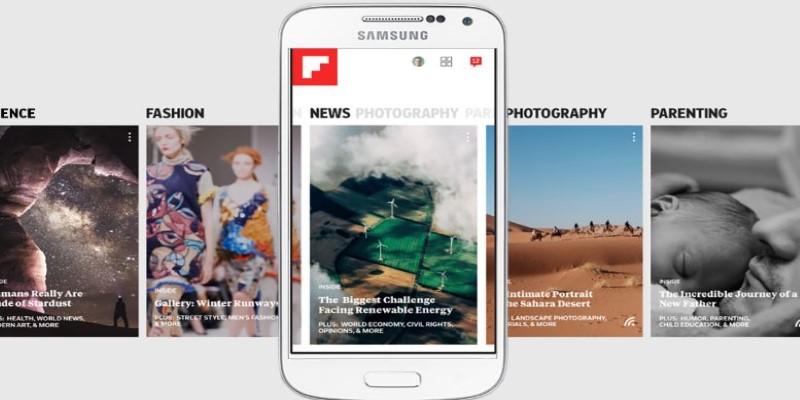
It’s especially enjoyable for visual learners and casual readers. Articles, photos, and videos are combined in an interactive layout that’s easy to browse. You can also create custom magazines—collections of stories on a topic—and share them publicly or keep them private.
Flipboard isn't ideal for breaking news or fast updates, but it excels at making reading feel more relaxed and engaging.
Newsify
Newsify combines RSS feeds with a newspaper-inspired design. It’s simple to set up and pleasant to use. You can add feeds directly or sync with a Feedly account. The app offers night mode, tagging, and the ability to download stories for offline reading.
What sets Newsify apart is its clean, well-organized layout. Articles are presented in a familiar format, making it easy to scan headlines or dive into full stories. It doesn’t rely on machine learning, so your feed stays exactly how you want it.
For users who want a balance of control, simplicity, and design, Newsify is a reliable option.
Conclusion
Finding the right news app can save time and make staying informed easier. Whether you need a fast way to browse headlines or a quiet space to read long-form articles, there’s something here that can help. Some readers value control and curation; others want speed and suggestions. The best newsreader application for iPhone is the one that makes news part of your day without getting in the way. Try a few, see what suits your style, and build a habit around it. Staying informed shouldn’t feel like a chore—it should feel natural.