Most iPhones come with excellent cameras, but they usually only let you use one lens at a time. That’s limiting when you're trying to film a conversation, reaction, or two angles of the same moment. DoubleTake, a free app from FiLMiC Inc., changes that. It lets you record from two different iPhone cameras at once—front, back, wide, telephoto—whatever your device allows. Whether you’re making vlogs, short films, or teaching something, this tool makes it simpler to capture more without needing a second phone or complicated editing.
What Is DoubleTake and How Does It Work?
DoubleTake is designed for people who want to use the iPhone’s multiple cameras at the same time. Instead of filming from one lens and missing the other angle, this app records two feeds together. It uses Apple’s multi-cam API, first introduced in iOS 13, and supports many camera combinations based on your model—front and back, or two rear lenses.
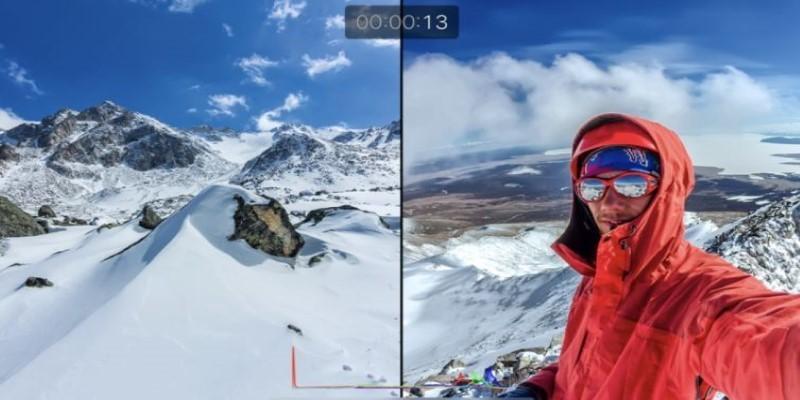
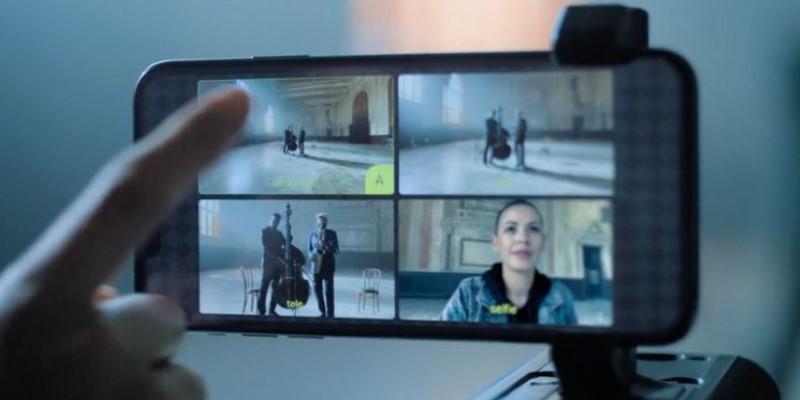
After launching the app, you pick two cameras. You can see both views either side-by-side or in a picture-in-picture layout. When you start recording, it captures both feeds at once in full HD. There’s no need to stitch them together later.
One thoughtful feature is how the app lets you save either a single video or two separate files. The split-screen view is handy if you want to post right away. Separate files are better for editing later. The layout preview lets you quickly decide what works for your scene. The entire process feels lightweight and efficient.
DoubleTake is not about flashy effects or in-depth manual control. It’s meant to get out of your way so you can just film. That’s its strength—keeping the experience focused.
Key Use Cases for DoubleTake
This app fits into many real-life situations. Interviews are a natural example. Instead of choosing who to film—the interviewer or the guest—you can record both in real time. That keeps the conversation more natural, and you won’t miss reactions or expressions.
Vloggers benefit when recording themselves while walking through a place or showing something interesting. One lens records their face; the other captures what they see. This works well for explainer videos or everyday updates.
For creators filming tutorials, DoubleTake can show both the teacher and the subject—like someone talking through a cooking step while filming the stove, or a musician playing and explaining a technique at the same time. It saves effort later because both views are already in sync.
It’s also a good fit for reaction videos. You can record someone watching a performance or reveal, with the reaction and source both captured. For parents, teachers, and event recorders, it’s a way to keep moments personal and complete.
Even short film makers or mobile storytellers can use this feature creatively—capturing simultaneous scenes or different angles without multiple setups.
Features and Limitations to Know About
DoubleTake sticks to the essentials. It offers a few viewing options: you can choose split-screen, where both views are equal, or picture-in-picture, which emphasizes one over the other. You can switch between these before you hit record. The recordings are in 1080p, which is more than enough for online content or mobile-based editing.
Not all iPhones support all camera combinations. Newer models—like the iPhone 12 and up—give you more flexibility, letting you pair front and rear cameras or mix telephoto and wide. Older models may be more limited, and some may only support certain dual-camera pairs.
The app doesn't allow 4K capture or long-form recording. It's designed for quick, focused clips—often up to 10 minutes. That's usually plenty for interviews or social content, but not ideal for full event coverage. It also doesn't include manual camera controls, such as white balance or focus lock. You can't adjust shutter speed or ISO. If you need more control, FiLMiC Pro is better suited.
For audio, it records from the internal mic by default. If you use a wired or wireless mic, it will automatically switch. There aren’t any special audio settings, but the sound quality is clean for general use.
One thing worth mentioning is that there are no ads or in-app purchases. It's completely free, and the experience is focused on recording, not selling.
How DoubleTake Helps Everyday iPhone Users?
DoubleTake brings a useful feature to more people without extra costs. Before this app, using two camera views meant owning multiple phones or editing together footage. Now, with one phone, you can cover both sides of a scene—yourself and what you see, the speaker and listener, the teacher and the task.
It gives casual users more ways to share their world. Parents filming birthdays, creators shooting low-budget projects, teachers preparing video lessons—all can benefit without changing their workflow.
The app's simplicity makes it feel natural to use. No account setup, no distractions—just open, choose your lenses, and record. It’s a rare kind of tool: single-purpose, effective, and free.
You won’t find studio-level settings here, but that’s not what DoubleTake is aiming for. Its job is to let people capture more with what they already have in their hands. And in that space, it does the job very well.
Conclusion
DoubleTake turns your iPhone into a dual-camera setup with almost no learning curve. It's built around one feature—recording two camera angles at once—and delivers it without any fluff. For interviews, daily videos, reactions, or creative storytelling, it helps you do more without buying anything extra. Though it has some limitations in resolution and length, the trade-off is simplicity and speed. It works right out of the box, doesn't cost anything, and solves a real problem for content creators, educators, and everyday users. If you’ve ever wanted to record two views at once, this app makes it easy to do just that.